Complete Guide to Choosing the Best Credit Card Reader for iPhone in 2026
Last update at January 2, 2026
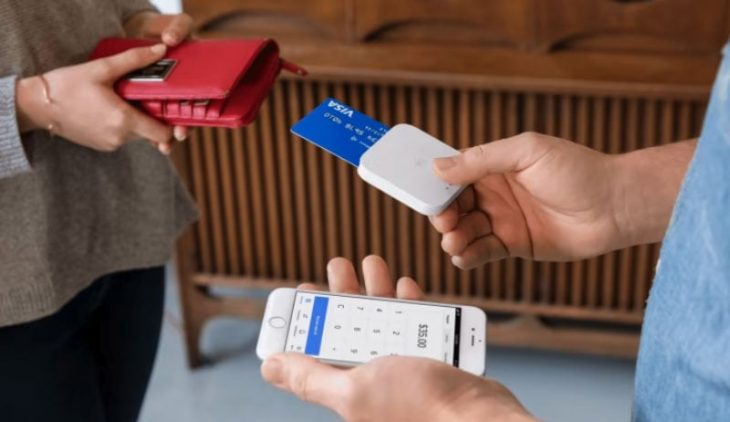
Mobile payment technology has revolutionized how businesses accept payments. For iPhone users, credit card readers make it easy to process transactions on the go, whether at a retail store, pop-up shop, or during client visits. Choosing the right credit card reader for iPhone can impact your transaction speed, payment security, and customer experience.
In this guide, we’ll break down the features, benefits, and pricing considerations to help you select the best option for your needs.
Why Use a Credit Card Reader for iPhone?
A credit card reader designed for iPhone enables businesses to process debit and credit card payments quickly without bulky POS systems. With contactless payments on the rise, these devices often support chip cards (EMV), NFC payments like Apple Pay, and swipe transactions.
Key benefits include:
-
Mobility – Accept payments anywhere your iPhone goes.
-
Ease of setup – Simple pairing via Bluetooth or direct Lightning connector.
-
Versatility – Works with multiple payment types and currencies.
-
Integration – Syncs with POS apps, inventory systems, and customer management tools.
Key Features to Look For in a Credit Card Reader for iPhone
When evaluating different models, prioritize:
-
Payment Method Support – EMV chip, magnetic stripe, and NFC/contactless.
-
Connectivity – Lightning port or Bluetooth pairing for wireless convenience.
-
Processing Speed – Faster transaction approval reduces checkout time.
-
Security – End-to-end encryption and PCI compliance for fraud protection.
-
Battery Life – Long-lasting performance for all-day events or busy shifts.
-
Software Features – Integrated invoicing, tipping, reporting, and refunds.
-
Pricing & Fees – Understand the transaction fees, monthly charges, and hardware costs.
How Pricing Typically Works
Credit card readers for iPhone are often offered in two ways:
-
Flat-Rate Pricing – A set percentage per transaction (e.g., 2.6% + 10¢).
-
Interchange-Plus – More transparent fees tied to card network costs plus a fixed markup.
Some providers charge no monthly fee, while others offer subscription models that include lower processing rates, advanced POS features, and premium hardware.
Use Cases for iPhone Credit Card Readers
-
Mobile Service Providers – Contractors, personal trainers, and consultants who accept payments on-site.
-
Retail Pop-Ups & Farmers’ Markets – Temporary locations where portability is essential.
-
Food Trucks & Delivery Services – Quick processing for on-the-go food and beverage sales.
-
Event Vendors – Easy setup for fairs, expos, and trade shows.
Pros and Cons of the Top Credit Card Readers for iPhone
When it comes to choosing the best credit card reader for iPhone, the market offers a variety of providers—each with its own strengths and trade-offs. While some stand out for competitive processing rates and easy setup, others excel in advanced POS features, robust customer support, or scalability for growing businesses. To help you make an informed decision, we’ve broken down the key pros and cons of the top providers, so you can see at a glance which option aligns best with your business needs, budget, and workflow.
1. Leaders Merchant Services
Best for small businesses wanting low rates and full-service support.
Leaders offers an affordable credit card reader for iPhone with quick setup and low transaction fees. Their mobile payment app integrates seamlessly with iOS devices, allowing you to accept swipe, chip, and tap payments.
Pros:
-
Competitive pricing with no hidden fees
-
24/7 customer support
-
EMV, contactless, and magstripe compatibility
Cons:
-
May require a contract for best rates
2. Merchant One
Best for flexible approval and quick onboarding.
Merchant One is known for approving merchants in almost any industry. Their mobile card reader for iPhone works via Bluetooth, allowing you to accept Visa, Mastercard, American Express, and Discover.
Pros:
-
Same-day approvals
-
No monthly minimums
-
User-friendly iPhone app
Cons:
-
Pricing transparency can vary based on volume
3. Stax
Best for subscription-style pricing.
Stax offers a flat monthly fee instead of per-transaction markups, making it ideal for high-volume businesses. Their iPhone card reader is EMV-certified and integrates with advanced reporting tools.
Pros:
-
Flat monthly pricing, no percentage markup
-
Integrates with accounting software
-
Contactless and chip card acceptance
Cons:
-
Monthly fee may not be cost-effective for low-volume sellers
4. Clover
Best for all-in-one POS and mobile selling.
Clover’s Go reader connects via Bluetooth to your iPhone, letting you process chip, contactless, and swipe payments. Clover also offers an entire POS ecosystem if you want to grow beyond mobile sales.
Pros:
-
Highly rated iOS app
-
Inventory and customer management tools
-
Scales from mobile reader to full POS
Cons:
-
Pricing depends on your processing plan
5. Worldpay
Best for global payment acceptance.
Worldpay provides a robust mobile credit card reader for iPhone that works for both domestic and international payments. It’s a top choice for businesses selling to a global customer base.
Pros:
-
Global payment support
-
Advanced fraud protection
-
Works with multiple currencies
Cons:
-
Contracts may be longer than competitors
How to Choose the Right Credit Card Reader for Your iPhone
When selecting a mobile credit card reader, consider:
-
Pricing model (flat fee vs. per-transaction rate)
-
Payment types (chip, contactless, magstripe)
-
Extra features like inventory management, invoicing, and analytics
-
Customer support availability
Final Thoughts
The best credit card reader for iPhone depends on your business size, sales volume, and feature needs.
-
Choose Leaders for low-cost full-service processing.
-
Go with Merchant One if you need fast approval and flexibility.
-
Pick Stax if you process high volumes and want predictable pricing.
-
Select Clover for advanced POS features.
-
Opt for Worldpay if you sell internationally.
With the right iPhone card reader, you can accept payments anywhere, grow your customer base, and keep your business running smoothly.
FAQs
Q: Can I use a credit card reader with any iPhone?
A: Most providers support iPhone models running iOS 11 or later via Bluetooth or Lightning connector.
Q: Do I need a merchant account?
A: Providers like Leaders, Merchant One, and Worldpay require a merchant account, while Clover and Stax offer integrated solutions.
Q: How much does it cost?
A: Costs vary — some charge a flat monthly fee (Stax), others take a percentage per transaction (Leaders, Merchant One, Clover, Worldpay).